
ACAS Tools / CADENCE / Compare
CADENCE vs Buffer for musicians
Buffer is a social media scheduler: you connect your channels and it publishes your posts on schedule, with analytics, comment replies and a link-in-bio page. CADENCE is a release workspace for musicians on your own computer: the story, the drafts for every channel, the approvals, the artwork sizes and the calendar for each release, and it never posts for you.
They work together. CADENCE can hand approved, unchanged post text to your own Buffer account, as a draft or as a post scheduled for its exact time. If all you need is scheduling, Buffer on its own is enough.
CADENCE: $29 launch price until Sunday, November 15, 2026 $39
One-time purchase · Free trial with a built-in sample release · Use your own AI provider or a local model
Side by side
CADENCE and Buffer at a glance
Buffer is where posts go out. CADENCE is where a release gets prepared, checked and tracked before that.
| CADENCE | Buffer | |
|---|---|---|
| What it is | A release workspace for artists: story, drafts, approvals, artwork sizes and calendar per release | “Social media management for everyone”: plan and schedule posts across platforms |
| Publishing | Never posts by itself. You finish each post in the platform app, through a supervised browser handoff, or by sending approved text to your own Buffer account | Publishes your scheduled posts to the channels you connect |
| Channels | Drafts for TikTok, Instagram, YouTube, Facebook, X, Threads and more | Bluesky, Facebook, Google Business Profile, Instagram, LinkedIn, Mastodon, Pinterest, Substack, Threads, TikTok, X and YouTube |
| Writing help | Drafts with your own AI provider (Anthropic, OpenAI, Groq, OpenRouter, Together AI or any OpenAI-compatible endpoint) or a local model in Ollama or LM Studio. Blank facts stay blank | AI Assistant to refine and repurpose content, on every plan |
| Numbers | Import platform CSV or JSON exports and get advice; it doesn't log in to your platforms | Insights analytics and reporting |
| Where it runs | On your computer: Windows 10/11, or Apple Silicon Mac with macOS 15+. No account, no CADENCE server, no telemetry | In the browser, with iOS and Android apps and a browser extension |
| Price model | One-time purchase: $29 launch price until November 15, 2026, then $39. Up to 3 computers you own | Free plan (up to 3 channels, 10 scheduled posts per channel) plus paid plans billed per channel, monthly or yearly |
Buffer details are from buffer.com and buffer.com/pricing, checked on 2026-10-20. Buffer may have changed its plans since.
Which to choose
Prepare the release, or just schedule the posts
Choose CADENCE if
- You work release by release and want everything for each one in one place
- You want to read and approve the exact text before anything is scheduled; editing an approved draft makes the approval stale
- You want reminders 72, 24, 6 and 1 hours before an unapproved post is due
- You want your own artwork fitted to square, story, thumbnail and feed sizes, offline
- You want your files, drafts and keys to stay on your own computer
Choose Buffer on its own if
- You only need posts scheduled and published, not release planning
- You post to LinkedIn, Pinterest, Bluesky, Mastodon or Google Business Profile
- You want to reply to comments and track analytics in one dashboard
- You manage social from your phone or as a team
- You're on an Intel Mac or Linux, which CADENCE doesn't support
Using both
How CADENCE hands posts to your Buffer
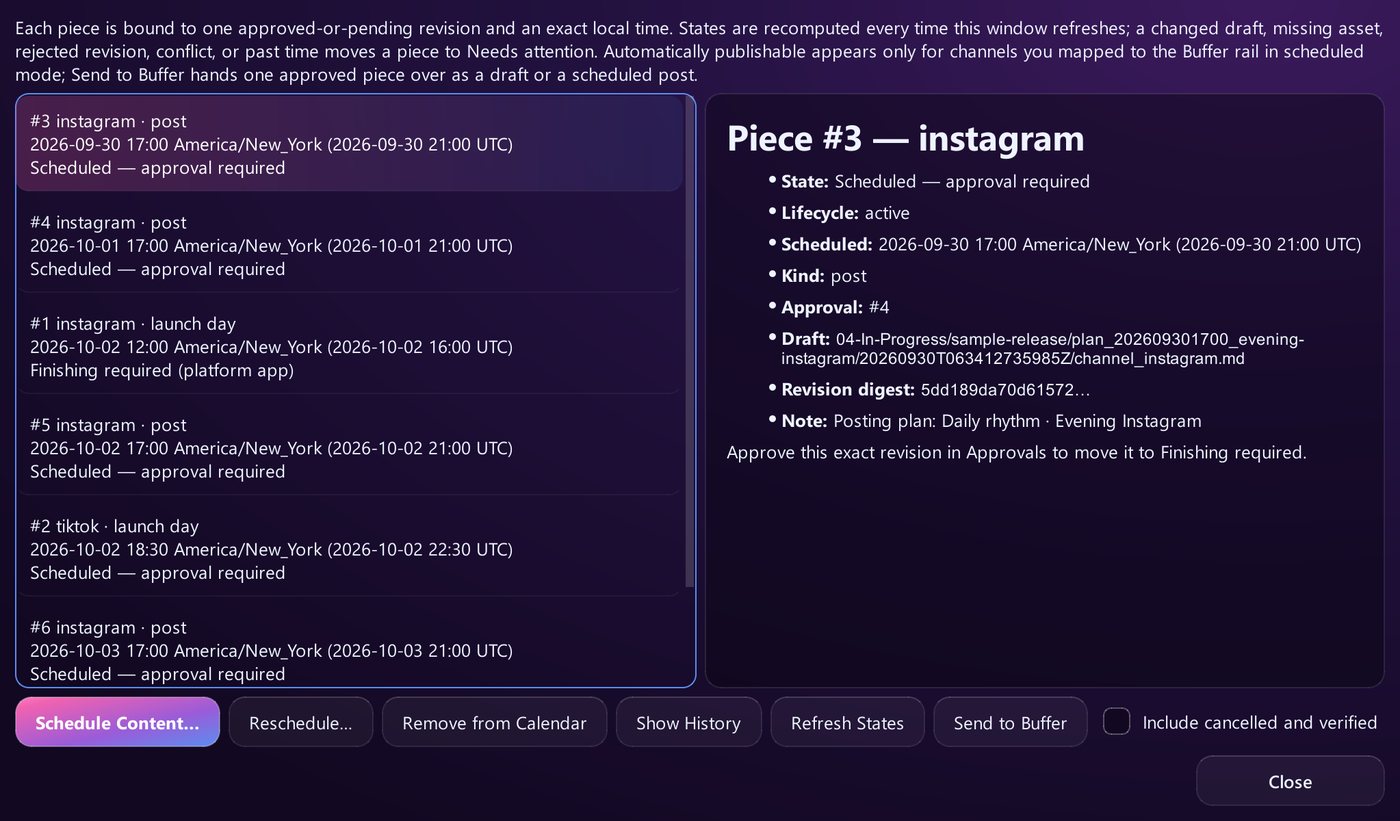
The Buffer rail is the one place CADENCE can send something out, and only to your own Buffer account. You connect it yourself with a personal API key from Buffer and map each CADENCE channel to a Buffer channel.
Only approved, unchanged text goes, once. A draft that's pending, rejected or edited after approval never leaves. Each piece is handed over a single time.
Two modes. In Draft mode Buffer receives a draft and you add media and schedule it there. In Scheduled mode Buffer receives the post with its exact time and publishes it.
Text only, for now. CADENCE keeps your artwork on your computer, so you add images in Buffer. Buffer's own plan limits on channels and queued posts still apply.
The Buffer rail needs a CADENCE license. The trial runs on a built-in sample release.
FAQ
Common questions
Is CADENCE a Buffer alternative for musicians?
Not really, it's a different tool. Buffer schedules and publishes posts. CADENCE prepares each release (story, drafts, approvals, artwork sizes, calendar) and never posts by itself. It can hand approved text to your own Buffer account, so you can use the two together.
Does CADENCE post to Instagram or TikTok for me?
No. You finish each post yourself: in the platform app, through a supervised browser handoff, or by sending the approved text to your own Buffer account, which then publishes it.
Can I use Buffer's free plan with CADENCE?
The Buffer rail uses a Buffer personal API key, and Buffer lists an API key on its free plan. The free plan's limits (up to 3 channels and 10 scheduled posts per channel) still apply, and CADENCE shows Buffer's message as is when it refuses a post.
Do I need an AI subscription?
No. Use your own key with Anthropic, OpenAI, Groq, OpenRouter, Together AI or any OpenAI-compatible endpoint (billed by them), or run a local model in Ollama or LM Studio. An Offline Demo needs no AI at all.
How much does CADENCE cost?
$29 launch price until Sunday, November 15, 2026, then $39. It's a one-time purchase covering up to 3 computers you own, with updates included. The trial has no time limit and runs on a built-in sample release.
Free trial
Every release, prepared. Every post, yours.
The trial has no time limit and runs on a built-in sample release. A license unlocks your own releases. One license covers up to 3 computers you own, with updates included.
Full CADENCE details · Questions: [email protected] · License terms · Buffer and platform names are trademarks of their owners; CADENCE is not affiliated with them.