

Generate the idea. Drag the MIDI.
MUSE writes chord progressions, melodies, rhythm parts, basslines and four-track clips inside your DAW. Edit them in the piano roll, then drag, export or route the MIDI to Serum, Kontakt or any instrument you already own.
$39 launch price until Sunday, November 15, 2026 $49
One-time purchase · Free trial, no time limit · Already own MUSE? Version 1.0 is free for you.
From a blank clip
An idea you can use, in the key and range you asked for.
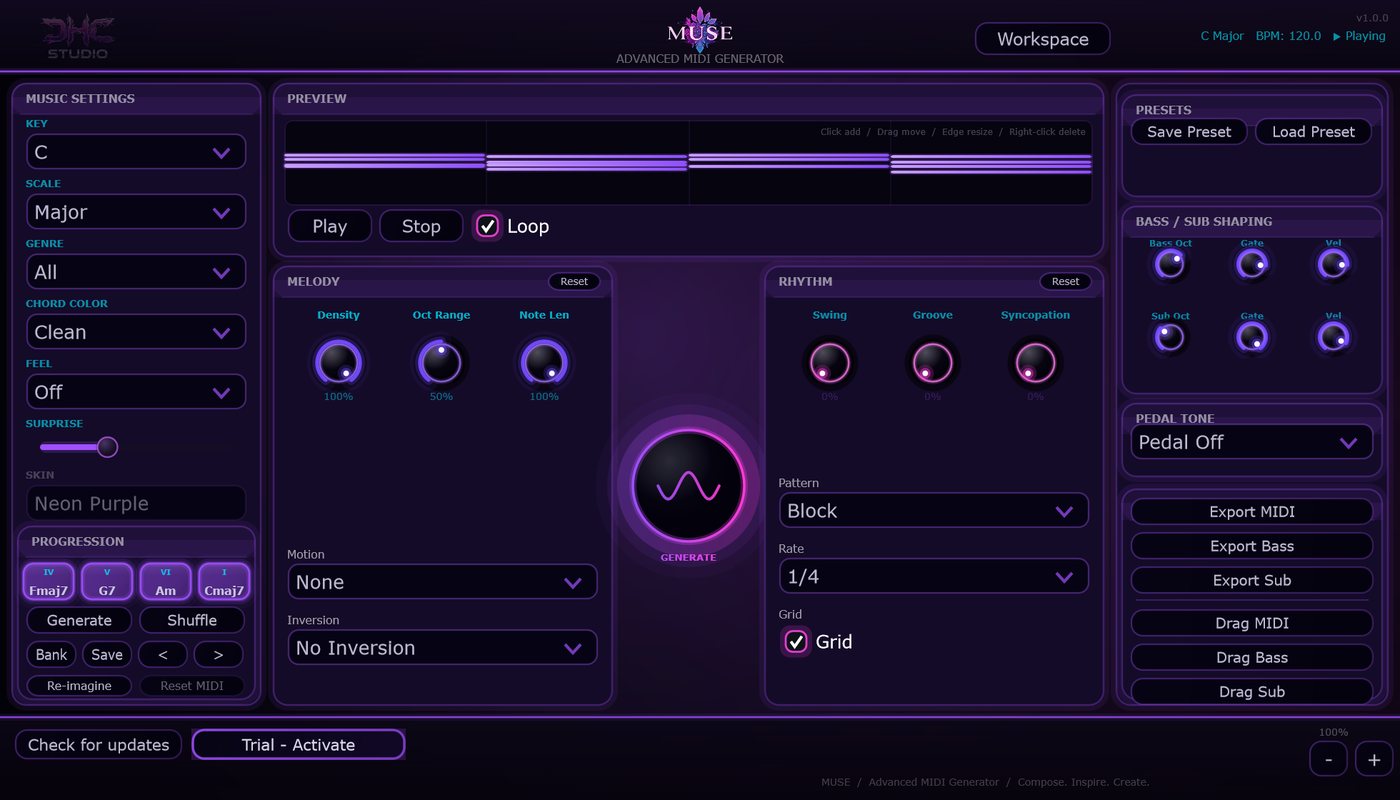
MUSE is for the moment the clip is empty. It writes parts that feel written, with repetition, stepwise motion, intentional rests and a cadence, then hands you the notes to keep, change or throw away.
Pick Key, Scale, Genre, Chord Color and Feel, and a rhythm pattern and rate.
Press Generate. MUSE writes a progression and a phrase; Shuffle keeps the chords and varies the rest.
Shape it: density, octave range, voicings, swing, groove, syncopation, arps, bass and sub.
Lock the rhythm, contour, harmony or groove you like and regenerate the rest.
Drag or export the MIDI, or route it live to an instrument track in your DAW.
Workspace
Four clips, four tracks each
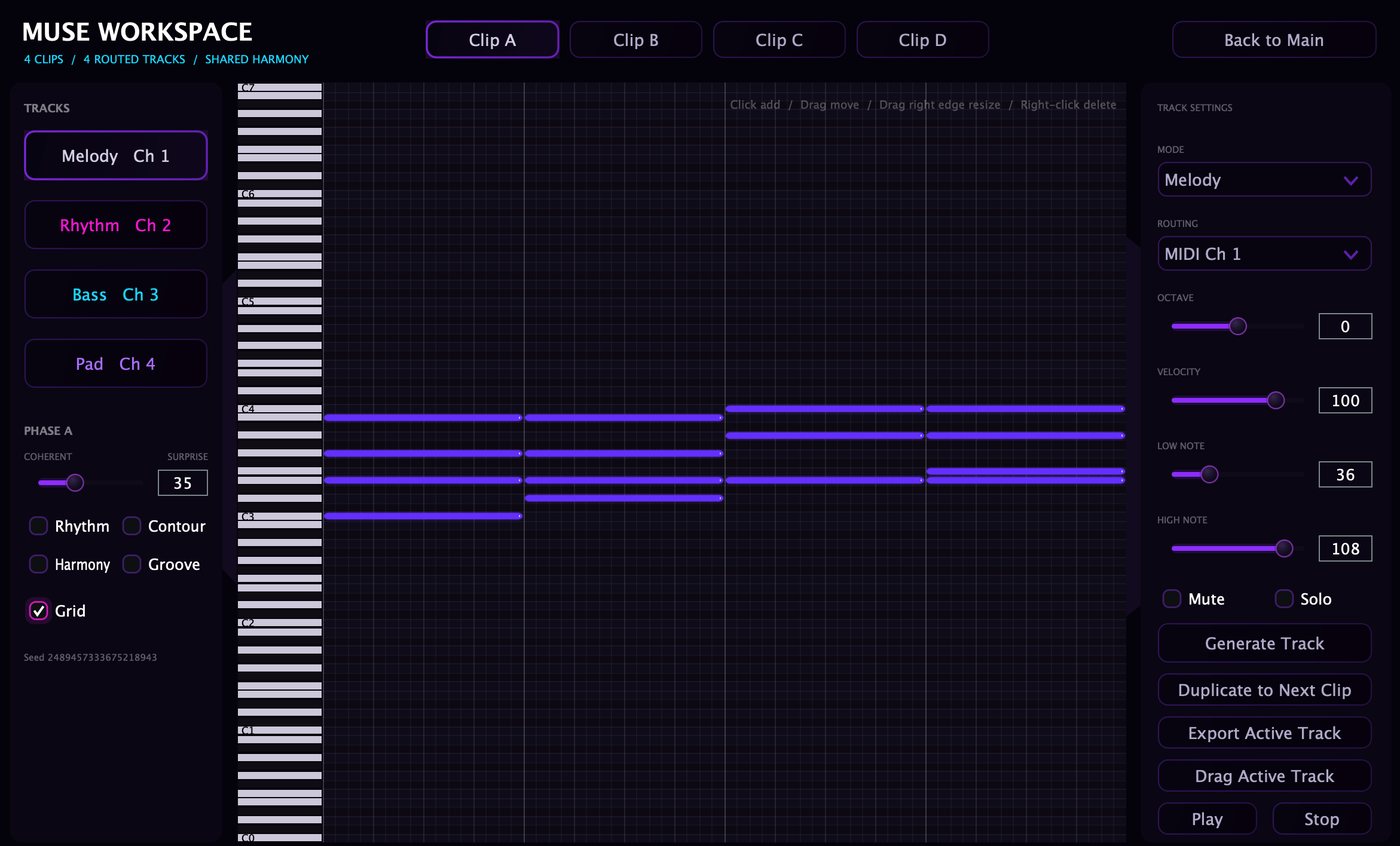
Press Workspace and the same window opens into clips A to D. Each clip has Melody, Rhythm, Bass and Pad tracks sharing that clip's harmony.
- MIDI channels 1 to 4 by default, any channel 1 to 16
- Mode, octave, velocity and note range per track; mute and solo
- Duplicate to Next Clip: a verse-to-chorus variation in one click
- Surprise sets how adventurous the generation gets, always in key and in range
Edit, re-imagine, deliver
It's your part once it's written.
Piano roll
Click to add, drag to move, drag the edge to resize, right-click to delete. Ghost notes show the other tracks; Grid keeps timing tight or lets it breathe.
Re-imagine
Load your own .mid file and let MUSE transform it. Reset MIDI brings back the original.
Saved with your project
Clips, notes, settings and locks are saved in your DAW project. Works fully offline, with no analytics or telemetry.
Honest limits
What MUSE is not.
Not a sound library
MUSE makes MIDI notes, not finished audio. The built-in sound is a preview; play the result through your own instruments.
Routing depends on your DAW
How well one MUSE splits its four Workspace channels across four instruments depends on the host (Ableton Live merges channels). Drag and export always work.
The trial doesn't drag out
Generate, edit and build clips in the trial for as long as you like. Dragging or exporting the MIDI needs a license.
Windows
Windows 10 or 11, 64-bit, VST3 host
Mac
Intel or Apple Silicon, macOS 11 or later, VST3 or AU host
Guides
Setup notes for Ableton Live, Logic Pro, FL Studio, REAPER and Cubase are in the user guide.
Free trial
Get past the empty clip.
The trial has no time limit: every control, the Workspace, the piano roll and Re-imagine. Buy when you're ready to drag the MIDI into your project. One license covers up to 3 computers you own, with updates included.
Using MUSE? Review it on KVR Audio · Questions: [email protected] · License terms · VST is a trademark of Steinberg Media Technologies GmbH.