
ACAS Tools / MUSE / Compare

Scaler alternative: MUSE
If you want a plug-in that writes the parts for you, MUSE is a Scaler alternative. It generates chord progressions, melodies, rhythm parts, basslines and four-track clips in the key and range you set, lets you edit them in a piano roll, then you drag or route the MIDI to your own instruments.
Scaler 3 is a broader music theory workstation: a library of over 1,000 chord sets, chord and key detection from MIDI and audio, an arrangement page and built-in sounds. If you want to browse, learn and detect harmony, Scaler is the better fit.
MUSE: $39 launch price until Sunday, November 15, 2026 $49
One-time purchase · Free trial, no time limit · Already own MUSE? Version 1.0 is free for you.
Side by side
MUSE and Scaler 3 at a glance
MUSE starts from a few musical choices and writes the parts. Scaler starts from a big library of chords and theory.
| MUSE | Scaler 3 (Scaler Music) | |
|---|---|---|
| What it is | A MIDI generator plug-in for chord progressions, melodies, rhythm parts, basslines, sub layers and four-track clips | A music theory workstation for chords, scales and composition |
| Starting point | Pick Key, Scale, Genre, Chord Color and Feel, plus a rhythm pattern and rate, then press Generate | Over 1,000 chord sets, keys and modes organised by mood, artist and genre; progression building with suggestions and voice leading |
| Melody, bass and patterns | Generates melody, rhythm, bass and sub; lock the rhythm, contour, harmony or groove you like and regenerate the rest | Motions: musician-made melody, bass, arpeggio and phrase patterns generated from chords |
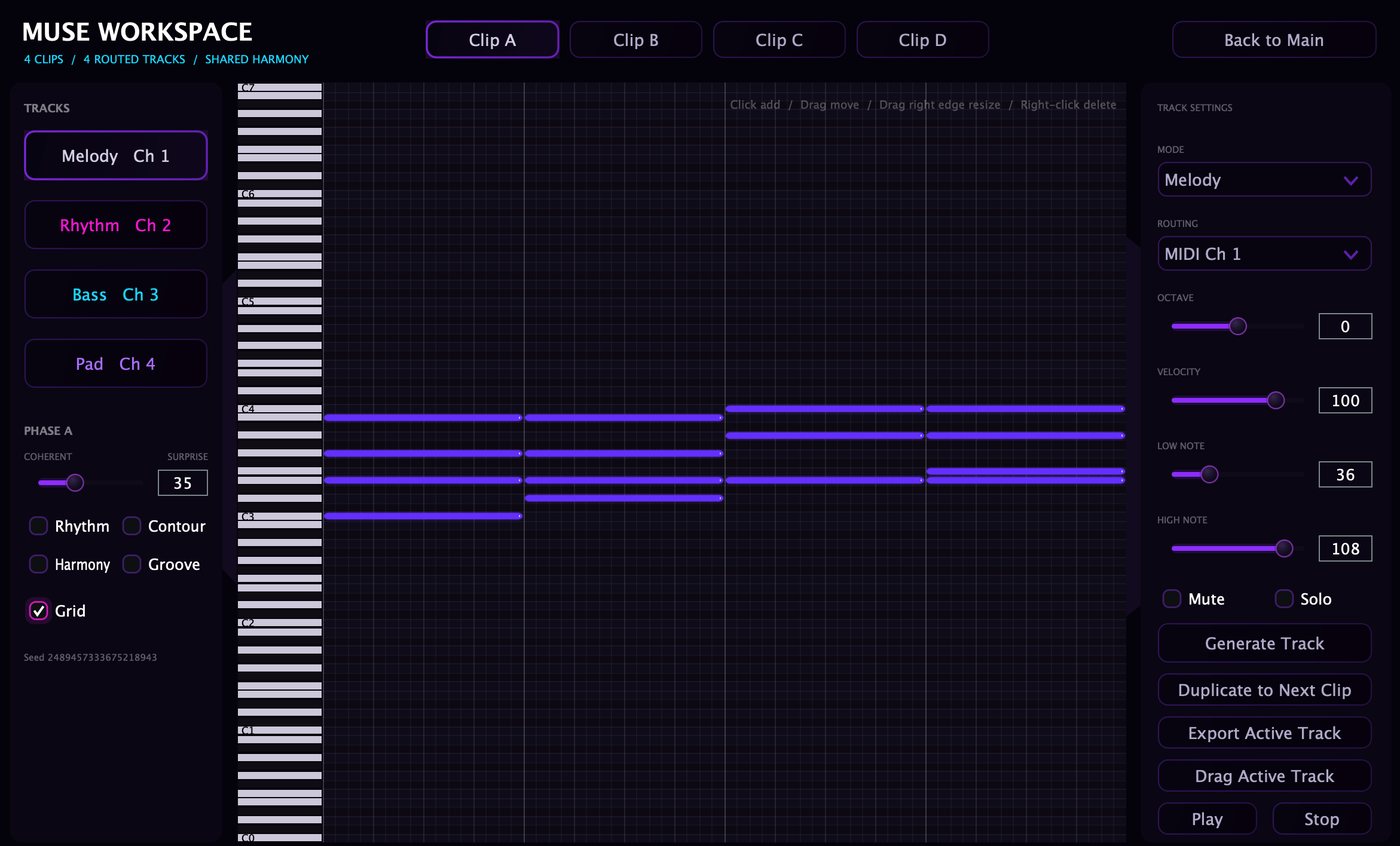
| Song structure | Workspace: clips A to D, each with Melody, Rhythm, Bass and Pad tracks sharing that clip's harmony | Scenes and an Arrange page timeline |
| Your own material | Re-imagine: load your own .mid file and let MUSE transform it | Chord, key and scale detection from MIDI and audio |
| Sound | MIDI notes only; the built-in sound is a preview. Play the result through your own instruments | 50 internal sounds, and it can host VST and AU instruments and effects |
| Getting the MIDI out | Drag or export the MIDI, or route it live on MIDI channels 1 to 16 | External MIDI Out, DAW sync and Live Sync across instances |
| Formats | VST3 on Windows 10/11; VST3 and AU on macOS 11+ (Intel and Apple Silicon) | Standalone plus VST, VST3, AU and AAX on Mac; standalone plus VST, VST3 and AAX on Windows. iPad version sold separately |
| Price model | One-time purchase: $39 launch price until November 15, 2026, then $49. Up to 3 computers you own or control | Sold at scalermusic.com with a free trial; see the site for the current price |
Scaler 3 details are from scalermusic.com, checked on 2026-10-20. Scaler Music may have changed them since.
Which to choose
Which one fits how you write
Choose MUSE if
- You want finished-feeling parts fast: progression, melody, rhythm, bass and pad from one Generate
- You like to keep what works (rhythm, contour, harmony, groove) and regenerate the rest
- You already have instruments you love and only need the MIDI
- You want four related clips (verse, chorus and variations) in one window
- You want something that works fully offline with no analytics or telemetry
Choose Scaler 3 if
- You want to browse a large library of chord sets by mood, artist or genre
- You need chord, key or scale detection from audio or MIDI
- You want built-in sounds or to host instruments inside the plug-in
- You work in Pro Tools (AAX), want a standalone app, or write on iPad
- Learning music theory while you write matters to you
Honest limits
What MUSE is not
Not a sound library. MUSE makes MIDI notes, not finished audio. The built-in sound is a preview.
Routing depends on your DAW. How well one MUSE splits its four Workspace channels across four instruments depends on the host (Ableton Live merges channels). Drag and export always work.
The trial doesn't drag out. Generate, edit and build clips for as long as you like. Dragging or exporting the MIDI needs a license.
From the same maker: RichChords is a free chord-glaze effect (unison, chorus, shimmer and pump behind six knobs) for the chord or pad bus. It shapes the sound of chords; it doesn't write them.
FAQ
Common questions
Is MUSE a good Scaler alternative?
It is if what you want from Scaler is new parts to drag into your project. MUSE generates progressions, melodies, rhythm parts, basslines and four-track clips and hands you the MIDI. If you want a large chord library, theory tools or chord detection, Scaler 3 covers that and MUSE doesn't.
Can MUSE detect chords from audio?
No. MUSE generates new material and can transform a .mid file you load (Re-imagine). Scaler 3 detects chords, keys and scales from MIDI and audio.
Does MUSE make sound?
Only a preview. MUSE outputs MIDI notes; for production you drag or export the MIDI, or route it live to Serum, Kontakt or any instrument you already own.
Does MUSE work in Pro Tools?
No. MUSE is VST3 on Windows and VST3 or AU on Mac. There is no AAX version. Setup notes for Ableton Live, Logic Pro, FL Studio, REAPER and Cubase are in the user guide.
How much does MUSE cost?
$39 launch price until Sunday, November 15, 2026, then $49. It's a one-time purchase covering up to 3 computers you own, with updates included. The trial has no time limit; dragging or exporting the MIDI needs a license.
Free trial
Get past the empty clip.
The trial has no time limit: every control, the Workspace, the piano roll and Re-imagine. Buy when you're ready to drag the MIDI into your project. One license covers up to 3 computers you own, with updates included.
Full MUSE details · Questions: [email protected] · License terms · Scaler and other product names belong to their owners; ACAS Tools is not affiliated with Scaler Music. VST is a trademark of Steinberg Media Technologies GmbH.