

Glitch it with your hands.
SPLINTER is a tempo-synced glitch and stutter plug-in you play, not program. Hold a pad and your track repeats, rolls, steps in pitch, reverses, scatters or tape-stops, always locked to your song's tempo. Play it with the mouse, MIDI notes, automation, or one hand in front of your webcam.
$9.99, one-time
Free trial with no time limit · One license covers up to 3 computers · Updates included
- NotarizedmacOS · by Apple
- SignedWindows installers
- pluginval L10Strictest test · Win + Mac
- One-time priceUpdates included
New in 1.1
Almost right? Keep it and fix just one step.
Chaos invents a new glitch on every step. That's great until it plays something you love except for one bad bit. In 1.1 you keep what Chaos played as a short loop and change only the piece you don't like.
KEEP THIS
Turns what Chaos just played into a loop of 1, 2 or 4 bars (PATTERN mode). It's exactly what you heard, and it repeats exactly. ENDLESS goes back to never-repeating Chaos.
THAT ONE! and the step strip
Press THAT ONE! right after the bad bit and SPLINTER opens that step. Change its card, make it a rest, change its length or slice, add GATE or CRUSH, move, lock or reroll it. MUTATE nudges one or two steps; A / B compares two versions.
VOCAL CHOP
Put SPLINTER on a vocal or synth line for an in-key chopped hook. It finds the syllables and re-pitches them to your key (root + scale) with one of 12 motifs. Variation, Harmony (octave or fifth) and six presets. Still zero latency.
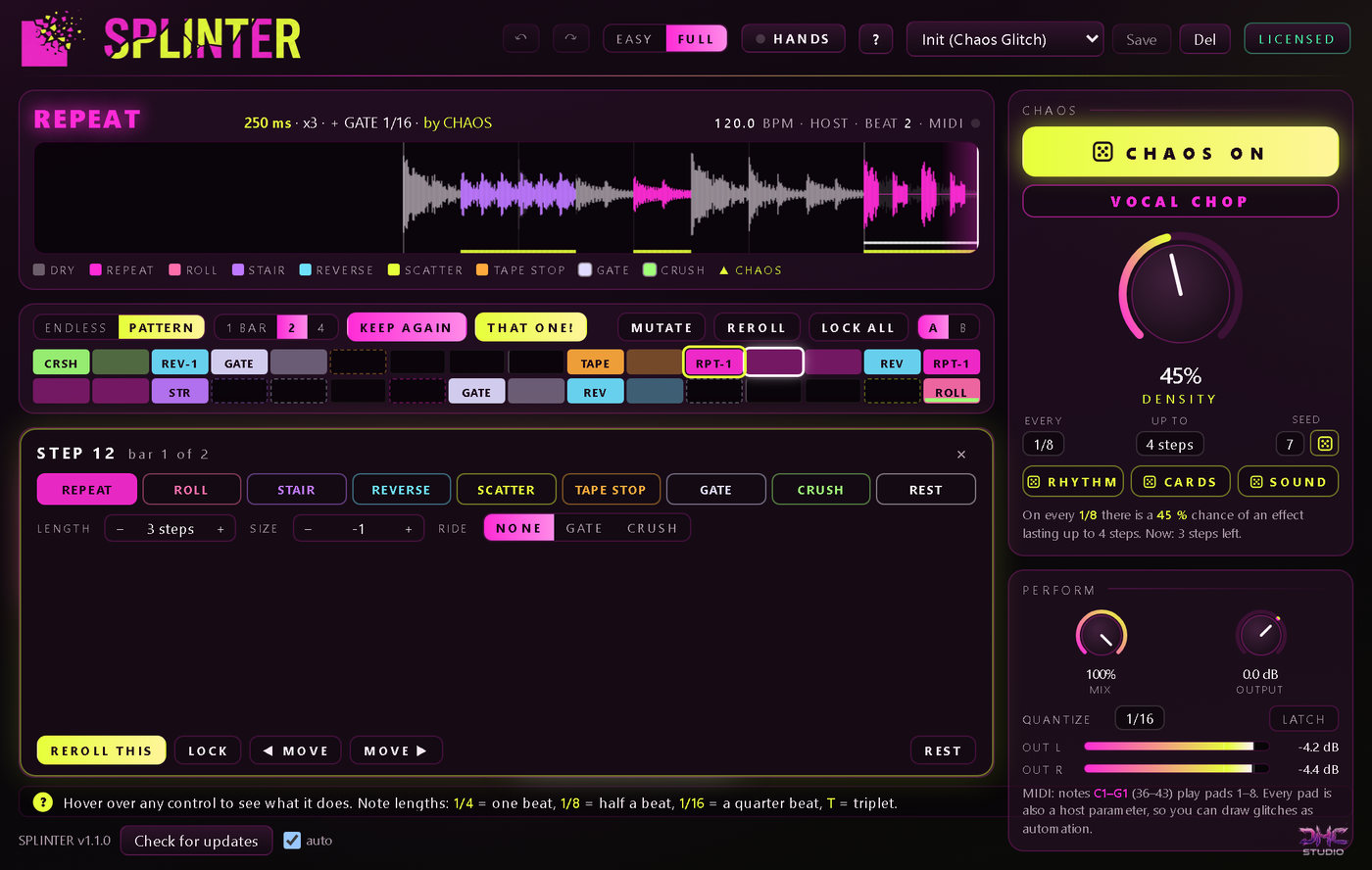
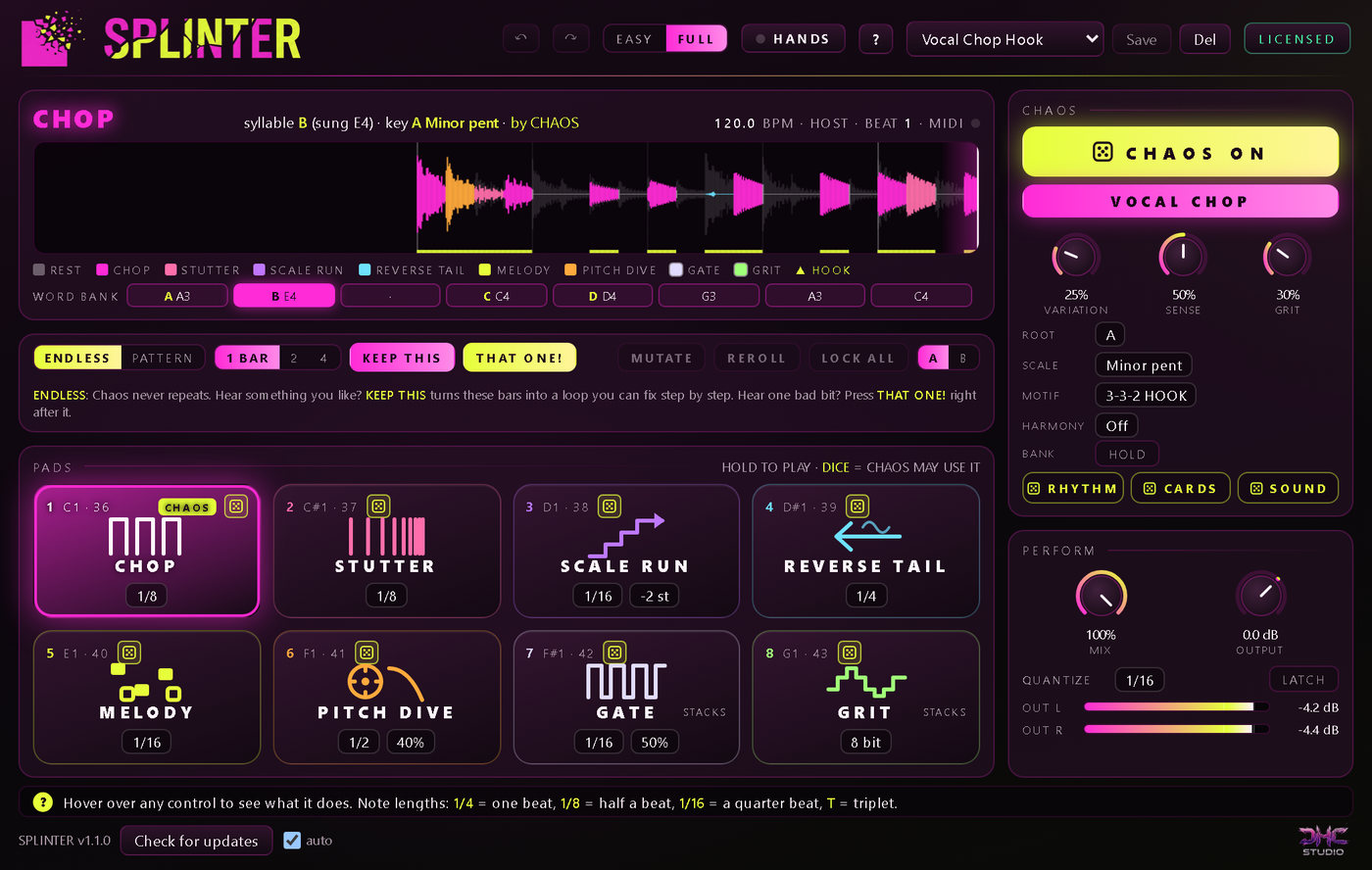
Also new: RHYTHM, CARDS and SOUND dice, and undo / redo for every change. VOCAL CHOP works best on a solo vocal; on a full mix the syllables play without pitching. Your 1.0 projects and presets load and sound exactly as before. Already on 1.0? Click Check for updates in the plug-in.
How it works
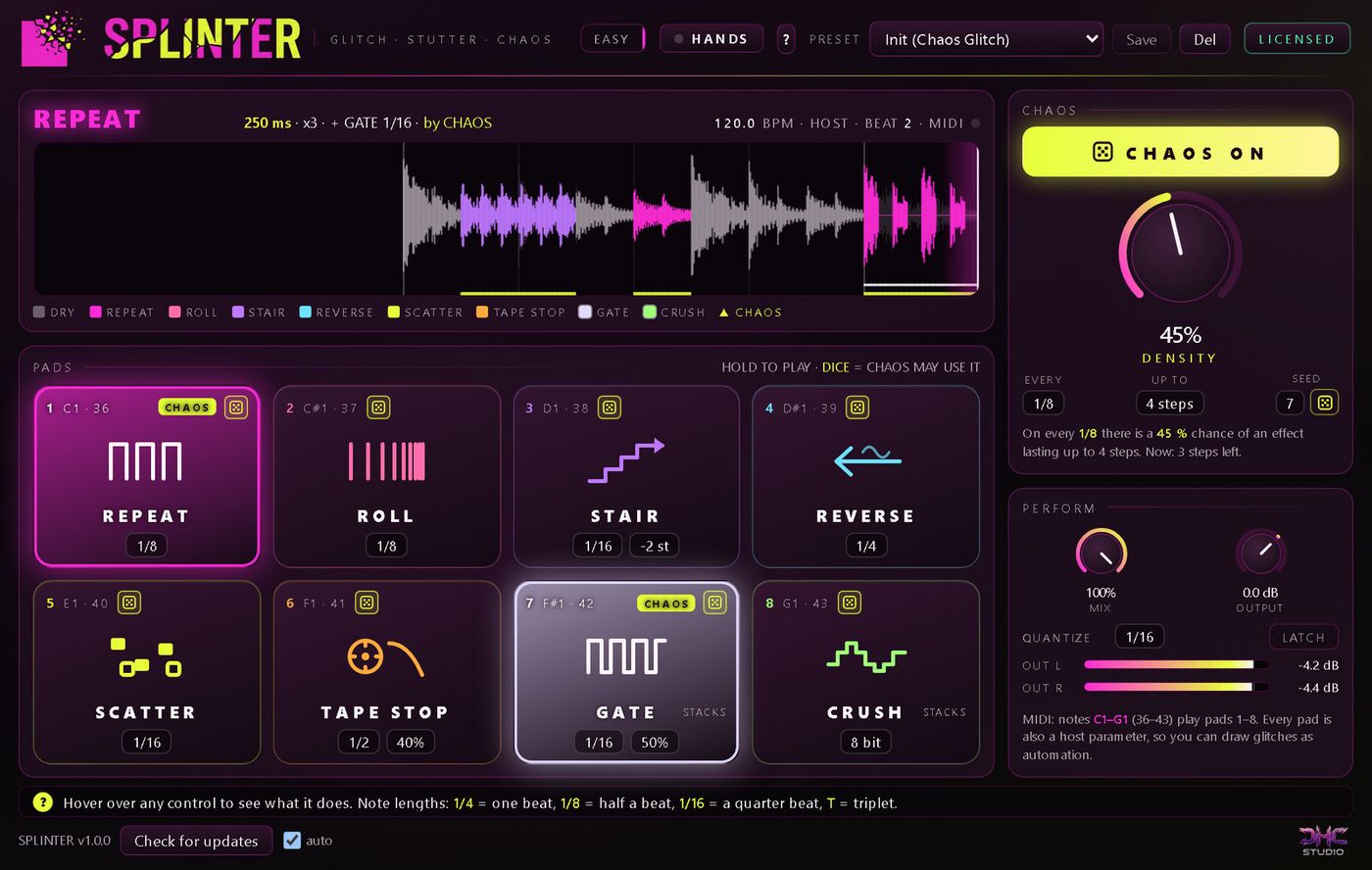
Press play and it glitches. Hold a pad and you take over.
SPLINTER keeps listening to the last ten seconds of your track. When a pad fires, it plays that audio back as repeats, rolls, pitch stairs, reverses, shuffled slices or a tape stop, in time with your song. There is no step sequence to build before you hear anything.
Put SPLINTER on any track or bus: a vocal, a synth, a guitar, a loop or the whole mix. Stereo or mono.
Press play. CHAOS is on when SPLINTER first loads, so your track starts glitching by itself.
Hold any of the 8 pads to glitch it yourself. Let go and SPLINTER comes back.
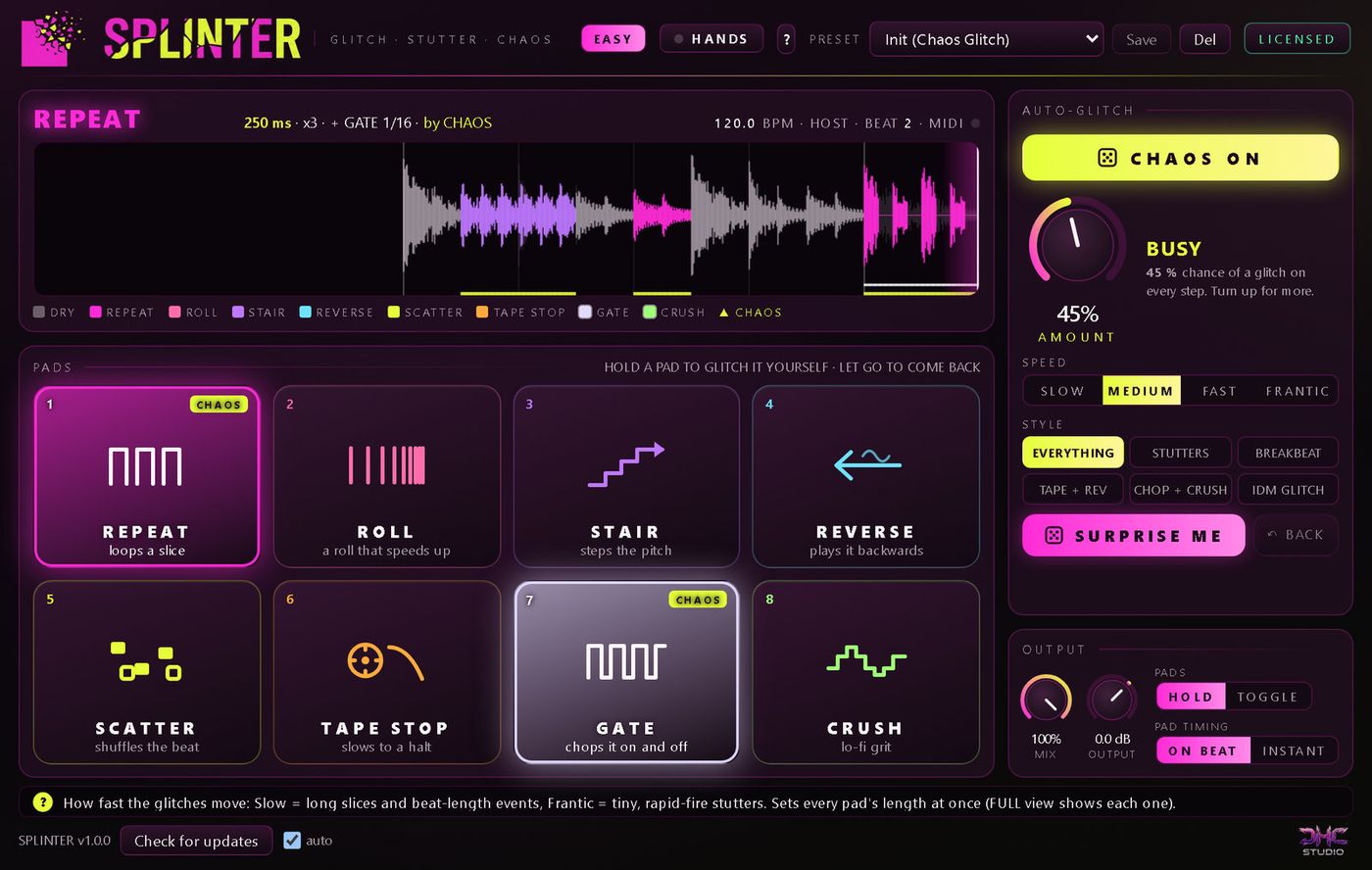
Change the feel with AMOUNT, SPEED and STYLE, or press SURPRISE ME for a fresh setup. The arrows at the top undo and redo any change.
Turn on HANDS and play the pads with one hand in front of your webcam.
HANDS
Point, pinch, play
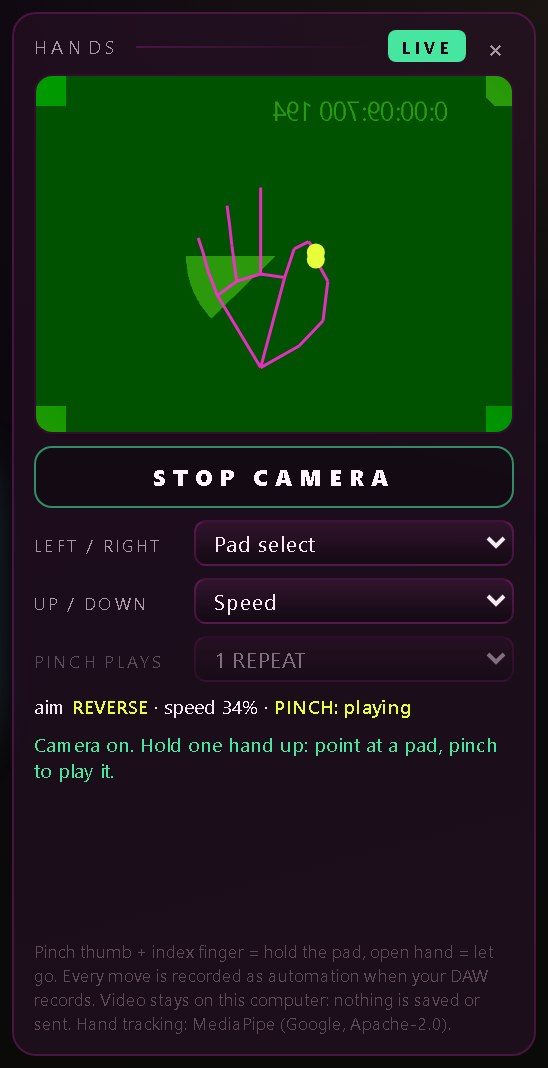
Click HANDS at the top of the window, then START CAMERA. Point at a pad, pinch your thumb and index finger to play it, and open your hand to let go.
- Up and down sets how fast the pinched pad stutters
- Choose what left / right and up / down do: Pad select, Speed, Mix, Chaos amount, Crush, Gate length, Stair step or Off. Your choice is saved with the project
- Your hand moves the real controls, so your DAW records it as automation
- A pinch pauses Chaos like a held pad. When your hand leaves the picture, the pad lets go, so nothing gets stuck
- A webcam is only needed for HANDS. Everything else works without one
Camera off until Start
The camera only turns on when you press Start. LIVE shows while it is on, and Stop or closing the window turns it off.
Video never leaves your computer
The picture is never saved, recorded or sent. It is used only to follow your hand while HANDS is on.
Hand tracking runs locally
HANDS uses MediaPipe (Google, Apache-2.0) running on your own computer. No account, no upload.
Mac: HANDS needs a DAW that allows camera access. If yours doesn't, HANDS tells you so and never touches the camera. The pads, MIDI, automation and Chaos work in every host.
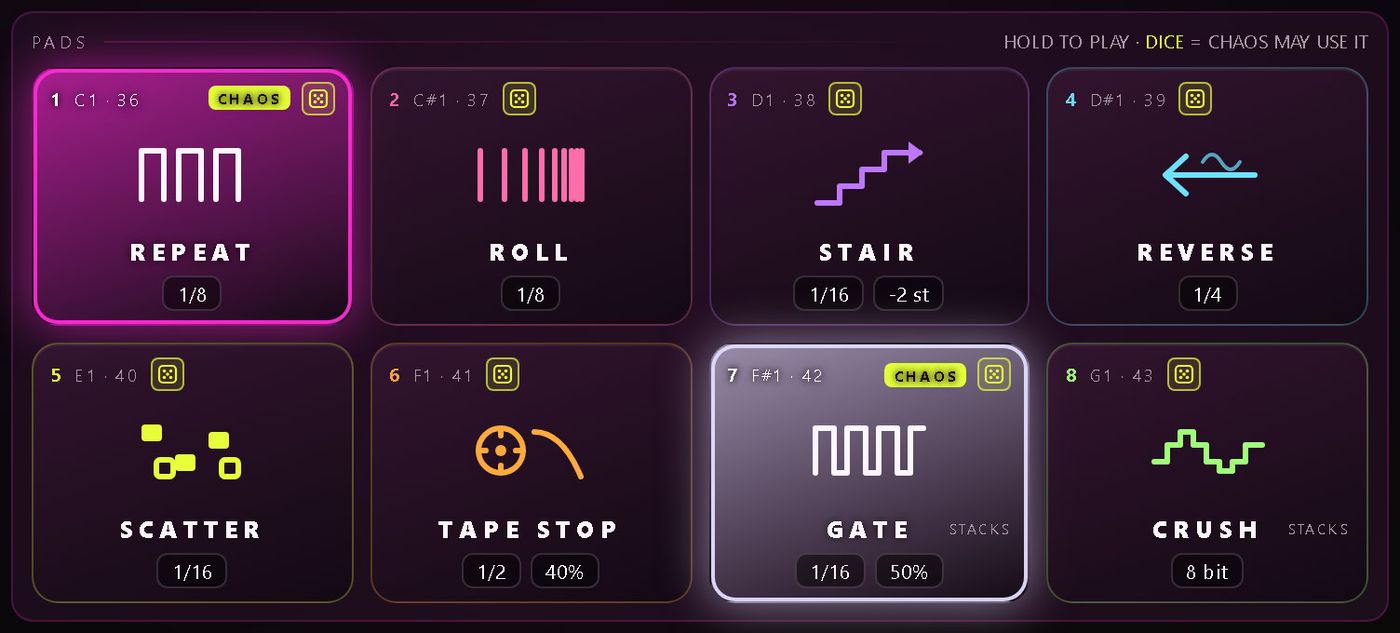
The 8 pads
Six glitches, plus two that stack
- REPEAT loops a slice
- ROLL halves the slice every beat, down to 1/64: the classic build-up
- STAIR steps each repeat in pitch, from -12 to +12 semitones
- REVERSE plays it backwards
- SCATTER shuffles the bar you just played, about a third of it reversed
- TAPE STOP slows to a halt over 1/8 to 2 bars, with a curve
- GATE and CRUSH stack on top of any of them
Slice sizes run from 1 bar to 1/64, triplets included. Quantize (Off to 1 bar) makes a late press still land on the beat. Play the pads with the mouse (hold or Latch), MIDI notes C1 to G1 (36 to 43), or automation: every pad is a host parameter, so it works even in hosts that never send MIDI to an effect.
CHAOS
Random-sounding, but repeatable
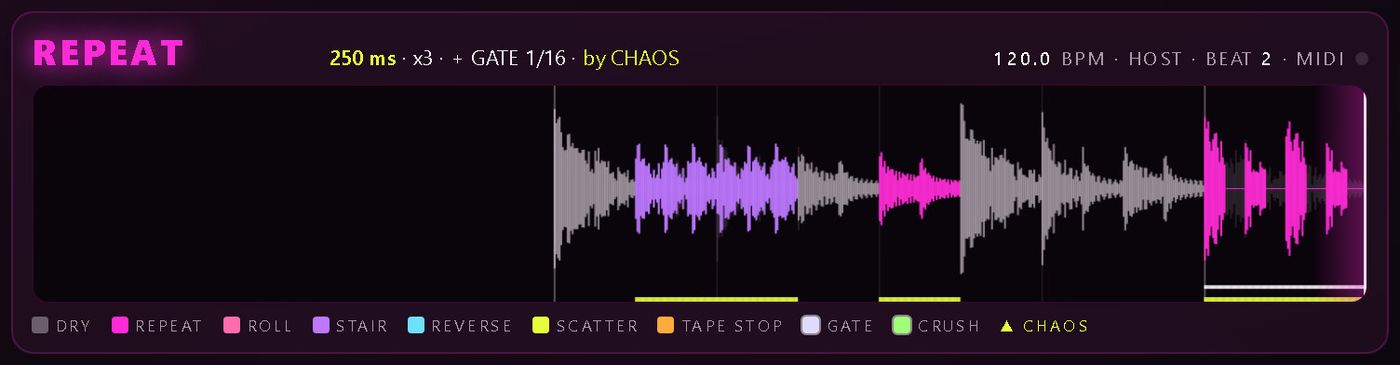
CHAOS fires the pads by itself on a grid. Unlike a random mode that changes every time, it works from a seed and your song position: the same bar glitches the same way on every playback and every bounce, so the bounce is what you heard.
- Grid of 1/4, 1/8 or 1/16, Density from 0 to 100 % (45 % by default), Length, Seed and a per-pad dice pool
- Hold a pad and Chaos pauses: you always win
- A live four-second timeline, coloured by what played, and a readout of the slice length, repeat count, semitones and tape speed
EASY and FULL
Start simple, open everything later
EASY view is the default: a few plain-English controls in place of note values and dials.
- AMOUNT: how often Chaos glitches
- SPEED: Slow, Medium, Fast or Frantic. Sets Chaos's grid and every pad's length at once
- STYLE: Everything, Stutters, Breakbeat, Tape + Rev, Chop + Crush or IDM Glitch
- SURPRISE ME rolls a fresh setup; the RHYTHM, CARDS and SOUND dice roll one part and keep the rest
- Undo and redo every change: arrows at the top, or Ctrl+Z / Ctrl+Y
FULL view keeps every setting: note values, seed and per-pad dice. Both views drive the same settings, so switching never changes the sound. Hover over any control and the help line says what it does.
Specs and honest limits
What to know before you buy.
Chaos starts on
When SPLINTER first loads, Chaos is on. One click or the Hands On preset turns it off.
STAIR is tape-style
Pitch and speed change together. It isn't a formant-preserving pitch shifter.
The trial
No time limit, with every pad, MIDI, automation, Chaos and preset. Two limits: every 45 seconds the output plays your dry track for 1.5 seconds (bounces too), and saving presets needs a license.
Windows
Windows 10 or 11, 64-bit, VST3 host. About 30 MB of disk.
Mac
Intel or Apple Silicon (universal), macOS 11 or later, VST3 or AU host. About 130 MB of disk.
HANDS
A webcam. On a Mac, a DAW that allows camera access.
Performance
Zero latency, click-free slice edges, under 0.5 % of one CPU core per instance at 48 kHz.
Presets
18 factory presets, from Riddim Chopper and Trap Roll Builder to Total Chaos and Hands On (no Chaos), plus six for VOCAL CHOP.
Internet
Only for activation by code and update checks.
FAQ
Common questions
Do I need a webcam?
No. HANDS is optional. The pads work with the mouse, MIDI notes C1 to G1 and automation, and Chaos plays them by itself.
Does my camera video go anywhere?
No. The camera is off until you press Start, and the video never leaves your computer. Hand tracking runs locally with MediaPipe (Google, Apache-2.0); the picture is never saved, recorded or sent.
Why doesn't HANDS start in my DAW on a Mac?
macOS only lets a plug-in use the camera if the DAW running it is allowed camera access. If your DAW doesn't allow it, HANDS says so and stays off. Everything else in SPLINTER still works.
Will my bounce sound like what I heard?
Yes. Chaos is worked out from a seed and the song position, so the same bar glitches the same way on every playback and every bounce.
Can I fix one glitch I don't like without losing the rest?
Yes, since 1.1. Press KEEP THIS to turn what Chaos played into a 1, 2 or 4-bar loop, then THAT ONE! (or click the step) and change, lock or reroll just that step. Every other step stays exactly as it was, and undo covers every change.
Does it work on vocals?
Yes. Any track works, and VOCAL CHOP mode (new in 1.1) turns a vocal or synth line into an in-key chopped hook: syllables re-pitched to your key, with 12 motifs. It works best on a solo vocal; on a full mix the syllables play without pitching. Pitch is tape-style, so far up gets bright and "chipmunk".
Does it add latency?
No. SPLINTER runs at zero latency, with click-free slice edges.
What does the free trial do?
Everything, with no time limit, except two things: every 45 seconds the output plays your dry track for 1.5 seconds (also in bounces), and saving presets needs a license. Projects save and reopen normally.
What does a license cost and cover?
$9.99, one-time. A perpetual license for up to 3 computers you own or control, with updates included. Refunds within 14 days through the store you bought from (see the license agreement).
Where is the manual?
The SPLINTER user guide (PDF) covers every control. For help, see SPLINTER support.
Can you control a glitch plug-in with your hands? →
Compare: Looking for a Gross Beat alternative? SPLINTER vs Gross Beat →
Free trial
Press play and hear it glitch.
The trial has no time limit and every pad, Chaos setting and preset works. Every 45 seconds it plays your dry track for 1.5 seconds, and saving presets needs a license. One license covers up to 3 computers you own, with updates included.
User guide (PDF) · Support · Questions: [email protected] · License terms · VST is a trademark of Steinberg Media Technologies GmbH.