
ACAS Tools / SPLINTER / Compare
Looking for a Gross Beat alternative? SPLINTER vs Gross Beat
Written by ACAS Tools · Updated November 8, 2026
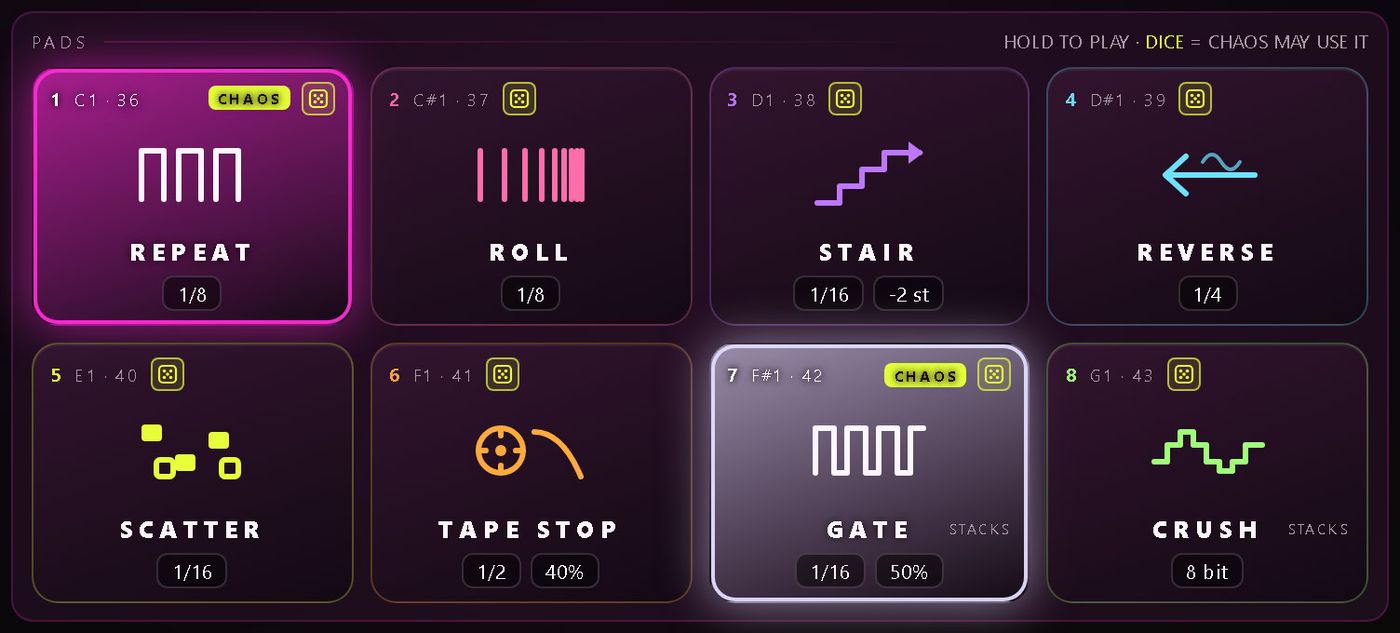
Both make beat-synced glitches and stutters from the audio already playing. Gross Beat, Image-Line's effect, works from time and volume envelopes: you pick or edit an envelope in one of its slots and it remaps playback and level along it. SPLINTER works from pads: hold one of 8 pads and your track repeats, rolls, steps in pitch, reverses, scatters or tape-stops in time with your song.
Pick Gross Beat if you want to draw your own time and volume curves, or you already have it in your FL Studio setup. Pick SPLINTER if you want to play glitches live from the mouse, MIDI, automation or one hand in front of your webcam, with nothing to program first.
SPLINTER: $9.99, one-time · free trial with no time limit
VST3 on Windows · VST3 and AU on Mac · Zero latency · One license covers up to 3 computers
Side by side
SPLINTER and Gross Beat at a glance
Gross Beat reshapes time along envelopes you choose. SPLINTER plays glitch moves you trigger.
| SPLINTER | Gross Beat (Image-Line) | |
|---|---|---|
| What it is | A tempo-synced glitch and stutter plug-in you play, not program | In Image-Line's words, “a real-time, audio-stream playback, pitch, position and volume manipulation effect” |
| How a glitch is made | Hold one of 8 pads: REPEAT, ROLL, STAIR, REVERSE, SCATTER, TAPE STOP, plus GATE and CRUSH that stack on top | Time and volume mapping envelopes: 36 time slots and 36 volume slots |
| Audio it works from | The last ten seconds of your track | A 2-bar rolling buffer |
| Ways to trigger | Mouse (hold or Latch), MIDI notes C1 to G1, automation (every pad is a host parameter), or one hand on your webcam (HANDS) | Slots can be triggered from MIDI notes, and slot changes can be linked to controllers and automated |
| Hands-off mode | CHAOS fires the pads on a grid from a seed and your song position, so every playback and bounce glitches the same way | Not compared here; see Image-Line's manual |
| Formats | VST3 on Windows 10/11; VST3 and AU on macOS 11+ (Intel and Apple Silicon). No AAX | A plug-in for FL Studio; its manual also refers to a VST version. See image-line.com for current formats |
| Price model | $9.99 one-time, up to 3 computers, updates included. Trial with no time limit | Paid; see image-line.com for the current price and which FL Studio editions include it |
Gross Beat details are from Image-Line's FL Studio online manual, checked on 2026-11-08. Image-Line may have changed them since.
Which to choose
Drawing curves vs playing pads
Choose SPLINTER if
- You want to hear a glitch the moment you press play, with no envelope or step sequence to build
- You perform: hold a pad, let go, and the track comes back
- You want to play it with one hand in front of a webcam, with the tracking kept on your computer
- You want random-sounding glitches that bounce exactly as you heard them
- You work in a VST3 or AU host and want a one-time $9.99 price
Choose Gross Beat if
- You want to draw your own time and volume curves, such as custom half-time or scratch shapes
- You already have it in your FL Studio setup
- You prefer editing a pattern to performing one
- You want separate time and volume envelopes
Other approaches
Built-in repeat devices and free glitch plug-ins
Your DAW's own tools. Some DAWs ship a repeat or stutter device, for example Ableton Live's Beat Repeat. If it already does what you need, you may not need a plug-in at all. SPLINTER adds playable pads, pitch stairs, tape stops, a repeatable Chaos mode and webcam control in any VST3 or AU host.
Step-sequenced glitch multi-effects. Several plug-ins chain glitch effects on a step grid you program ahead. They suit planned, pattern-based edits. SPLINTER is built the other way round: nothing to program, you play it.
Free glitch plug-ins. Free stutter and glitch plug-ins exist and are worth a try. SPLINTER isn't free, but its trial has no time limit and every pad, Chaos setting and preset works; it plays your dry track for 1.5 seconds every 45 seconds, and saving presets needs a license.
Want to play it with your hands? How HANDS mode works →
FAQ
Common questions
Is SPLINTER a Gross Beat alternative?
For playing glitches live, yes. Both make beat-synced stutters from the audio already playing. Gross Beat remaps time and volume along envelopes you choose; SPLINTER gives you 8 pads (repeat, roll, pitch stair, reverse, scatter, tape stop, gate and crush) that you hold to play. If you want to draw your own curves, Gross Beat is the closer fit.
Does SPLINTER work in FL Studio?
SPLINTER is a VST3 effect on Windows and VST3 or AU on Mac, and FL Studio hosts VST3 plug-ins. Every pad is also a host parameter, so it works even in hosts that never send MIDI to an effect.
Can SPLINTER do tape stops and reverse?
Yes. TAPE STOP slows to a halt over 1/8 to 2 bars with a curve, and REVERSE plays the slice backwards. STAIR steps each repeat in pitch from -12 to +12 semitones, tape-style, so pitch and speed change together.
Will my bounce sound like what I heard?
Yes. Chaos is worked out from a seed and the song position, so the same bar glitches the same way on every playback and every bounce.
Does it add latency?
No. SPLINTER runs at zero latency with click-free slice edges, using under 0.5 % of one CPU core per instance at 48 kHz.
How much does SPLINTER cost?
$9.99, one-time, for up to 3 computers you own or control, with updates included. The trial has no time limit: every 45 seconds it plays your dry track for 1.5 seconds, and saving presets needs a license.
Free trial
Glitch it with your hands.
Press play and hear it glitch. The trial has no time limit and every pad, Chaos setting and preset works. One license covers up to 3 computers you own, with updates included.
Full SPLINTER details · Support · Questions: [email protected] · License terms · Gross Beat, FL Studio, Ableton Live and other product names belong to their owners; ACAS Tools is not affiliated with Image-Line or Ableton. VST is a trademark of Steinberg Media Technologies GmbH.