
ACAS Tools / SPLINTER / Answers
Can you control a glitch plug-in with your hands?
Answered by ACAS Tools · Updated November 5, 2026
Yes. SPLINTER is a tempo-synced glitch and stutter plug-in with a webcam mode called HANDS: point at one of its 8 pads, pinch your thumb and index finger to play it, and open your hand to let go. Moving your hand up and down sets how fast the stutter runs.
The hand tracking runs on your own computer. The camera is off until you press Start, and the video is never saved or sent. Your hand moves the plug-in's real controls, so your DAW records the performance as automation. VST3 on Windows, VST3 and AU on Mac, $9.99 with a free trial.
SPLINTER: $9.99, one-time · free trial with no time limit
A webcam is only needed for HANDS. The pads also play from the mouse, MIDI notes and automation.
How
Your first hand-played glitch
Put SPLINTER on a track or bus and press play.
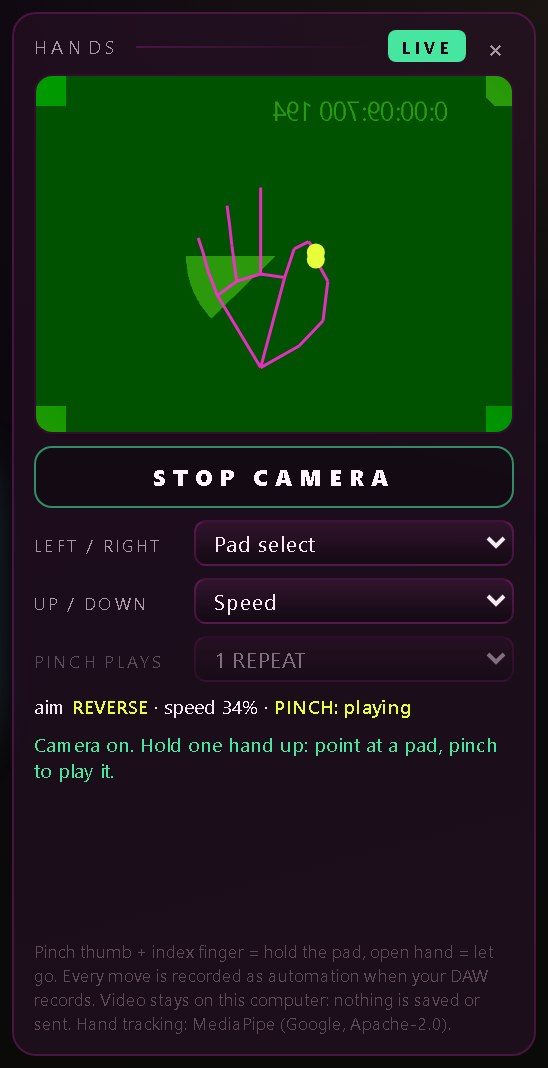
Click HANDS at the top of the SPLINTER window, then START CAMERA. LIVE shows while the camera is on.
Hold one hand up and point left or right to aim at a pad.
Pinch thumb and index finger to play it. Raise or lower your hand to change the stutter speed.
Open your hand to let go. Record-arm the automation in your DAW and the moves are written as automation.
Honest limits
What to know first
One hand, set moves
HANDS reads pointing, pinching, height and an open hand. Left / right and up / down can each be set to Pad select, Speed, Mix, Chaos amount, Crush, Gate length, Stair step or Off. It isn't a general gesture-to-MIDI tool.
Mac camera permission
macOS only lets a plug-in use the camera if your DAW is allowed camera access. If it isn't, HANDS says so and stays off; the rest of SPLINTER works as normal.
Not the only way to play
Hands are expressive, not sample-exact. When you want exact timing, use MIDI or automation: SPLINTER takes MIDI notes C1 to G1 and every pad is automatable, and Quantize lands a late press on the beat.
FAQ
Common questions
Does my webcam video leave my computer?
No. Hand tracking runs locally with MediaPipe (Google, Apache-2.0). The picture is never saved, recorded or sent, and the camera is only on between Start and Stop.
What happens if my hand leaves the picture?
The pad lets go, so nothing gets stuck. A pinch also pauses SPLINTER's Chaos mode the same way a held pad does.
Does it record into my DAW?
Yes. Your hand moves SPLINTER's real controls, so when your DAW records automation, the hand performance is written like any other automation.
Does it add latency?
No. SPLINTER's audio runs at zero latency with click-free slice edges.
What do the 8 pads do?
REPEAT, ROLL, STAIR (-12 to +12 semitones), REVERSE, SCATTER and TAPE STOP, plus GATE and CRUSH, which stack on top. Slices run from 1 bar to 1/64, triplets included, always locked to your song's tempo.
Can I try it first?
Yes. The trial has no time limit. Every 45 seconds it plays your dry track for 1.5 seconds, and saving presets needs a license. A license is $9.99, one-time, for up to 3 computers.
SPLINTER
Glitch it with your hands.
A tempo-synced glitch and stutter plug-in you play with pads, MIDI, automation or one hand in front of your webcam. Free trial, then $9.99.
SPLINTER on the products page · User guide (PDF) · Support · Questions: [email protected]