
ACAS Tools / PULSE / Compare

Kick and bass clashing? Sidechain, EQ or PULSE
Written by ACAS Tools · Updated November 8, 2026
A kick and bass clash when both carry energy in the same low frequencies at the same moments. The usual fixes are ducking the bass when the kick hits (sidechain compression or a volume-shaping plug-in) and carving one of them with EQ so each owns its own range.
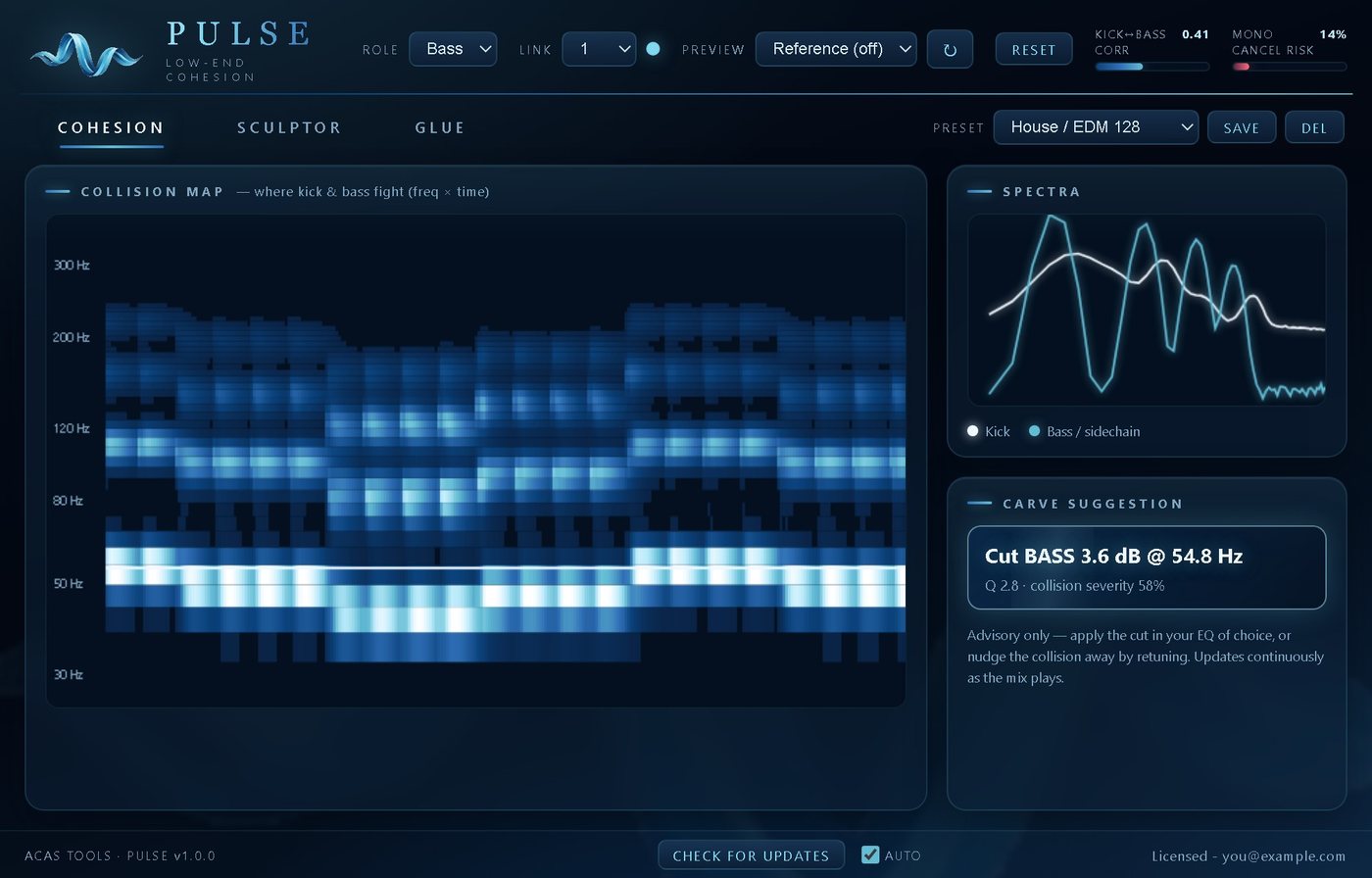
PULSE is for finding the fight before you fix it: a live collision map (25 to 400 Hz) lights up only where kick and bass carry energy at the same moment, and a carve suggestion says which one to cut, at what frequency and how deep. Its Transient-Locked Glue then ducks on detected kick hits rather than on level. For a simple pump, a plain sidechain compressor is still the quickest fix.
PULSE: $49
One-time purchase · Free trial with no time limit (analysis only) · Works fully offline
Side by side
Four ways to fix a kick and bass clash
Most mixes use more than one. The question is which one finds the problem and which one fixes it.
| What it does | Good for | Watch out for | |
|---|---|---|---|
| Sidechain compressor | Turns the bass down whenever the kick's signal crosses a threshold | The classic pump, and quick fixes in most genres | Needs sidechain routing; reacts to level, so it ducks the whole bass, not only the clashing range |
| Volume-shaping (ducking) plug-in | Applies a repeating volume curve to the bass, synced to tempo or triggered by MIDI | Predictable, shape-exact ducking for steady kick patterns | Follows a pattern rather than the actual kick, so changing or off-grid kick patterns need extra work |
| EQ carve (static or dynamic) | Cuts the bass where the kick's fundamental sits, or the reverse; a dynamic EQ cuts only while the other sound plays | Keeping the bass level steady while freeing one range | You have to find the right frequency, depth and Q first |
| PULSE | Shows where and when kick and bass both carry energy, suggests the carve, and glues the low end with ducking that triggers on detected kick hits | Finding the real collision, and deciding which sound should give way | The carve suggestion is advisory: you apply it in your own EQ. It works on the low end only, not the full mix |
The first three rows describe general mixing techniques, not any one product. PULSE details come from its product page.
Which to choose
Which fix to reach for
Reach for PULSE if
- You can hear mud but can't tell whether the kick or the bass should give way
- You want to see where the fight is (25 to 400 Hz) before cutting anything
- Your sub vanishes on a phone and you want to hear it as Phone, Earbuds, Laptop or Club before you bounce
- You want glue that ducks on the kick, so a sustained bass note doesn't pump the compressor
- You'd rather drop one plug-in on the kick + bass group than set up routing
A sidechain compressor is enough if
- You want the classic pumping sound and already know where the clash is
- Your kick and bass are already tuned and only need a little room on each hit
- You mix in Pro Tools: PULSE has no AAX version
- You need a fix right now with a plug-in you already own
Why sidechain alone isn't always enough
Ducking hides the clash. Carving removes it.
A sidechain compressor makes room in time: the bass gets quieter while the kick plays. If the two still share the same low range, the low end can stay muddy, and pushing the ducking harder turns into audible pumping you didn't ask for.
Carving makes room in frequency: one sound gives up the range the other needs. The hard part is knowing which range and which sound. That's what PULSE's collision map and carve suggestion are for: the suggested EQ move is aimed at whichever source loses less, and its kick-bass correlation and Mono Cancel Risk meters flag phase trouble and mono loss.
Ordinary glue compressors react to level, so a sustained bass note pumps them just like a kick. PULSE's three-band Glue (SUB, LOW, HIGH) triggers on detected kick hits, and Lock blends level-based compression with pure transient-locked ducking.
Making the bass too? Free growl bass synth →
FAQ
Common questions
How do I stop my kick and bass clashing?
Find where they overlap, decide which sound owns that range, then make room: carve the other one with EQ, duck it when the kick hits, or both. Tuning the bass to the kick helps too. PULSE shows the overlap on a collision map and suggests which source to cut, where and by how much.
Is PULSE a sidechain plug-in?
Partly. Its Transient-Locked Glue ducks the low end on detected kick hits. On the kick + bass group (Bus role) it needs no routing at all; on the bass with the kick in the sidechain you get the tightest glue; and in Linked mode two instances share analysis with no routing when both run in the same DAW process.
Does PULSE EQ the bass for me?
No. The carve suggestion is advisory: you apply it in the EQ you already use, or retune the bass.
Does PULSE work in Pro Tools?
No. PULSE is VST3 on Windows and VST3 or AU on Mac. There is no AAX version.
Does the free trial process audio?
No. All analysis is free with no time limit: the collision map, spectra, meters, carve suggestion and Linked mode. Sculptor, Glue and the translation preview are bypassed until you activate, so audio passes through untouched.
How much does PULSE cost?
$49. It's a one-time purchase covering up to 3 computers you own, with updates included.
Free trial
Find the fight in your busiest 8 bars.
The trial has no time limit: the collision map, spectra, meters, carve suggestion and Linked mode all work in full. A license turns on the processing. One license covers up to 3 computers you own, with updates included.
Full PULSE details · Support · Questions: [email protected] · License terms · Product names belong to their owners. VST is a trademark of Steinberg Media Technologies GmbH.